 PruTAN
 Creating a Rest Request
REST API platform
To Create a REST request,
- Select a Collection, On
hoveror onthree dot click, user will see an icon to create a request. - Click on the icon will open a dialog box.
- Provide label and save to create a request.
- Navigate to the created request and select it.
- Now provide the necessary data like
Method, URL, Port, Params, Headers, Body etc.to configure the created request. - Click
Savebutton to save the request.
Now try it yourself, copy the below API endpoint and create a GET request.
https://dummyjson.com/products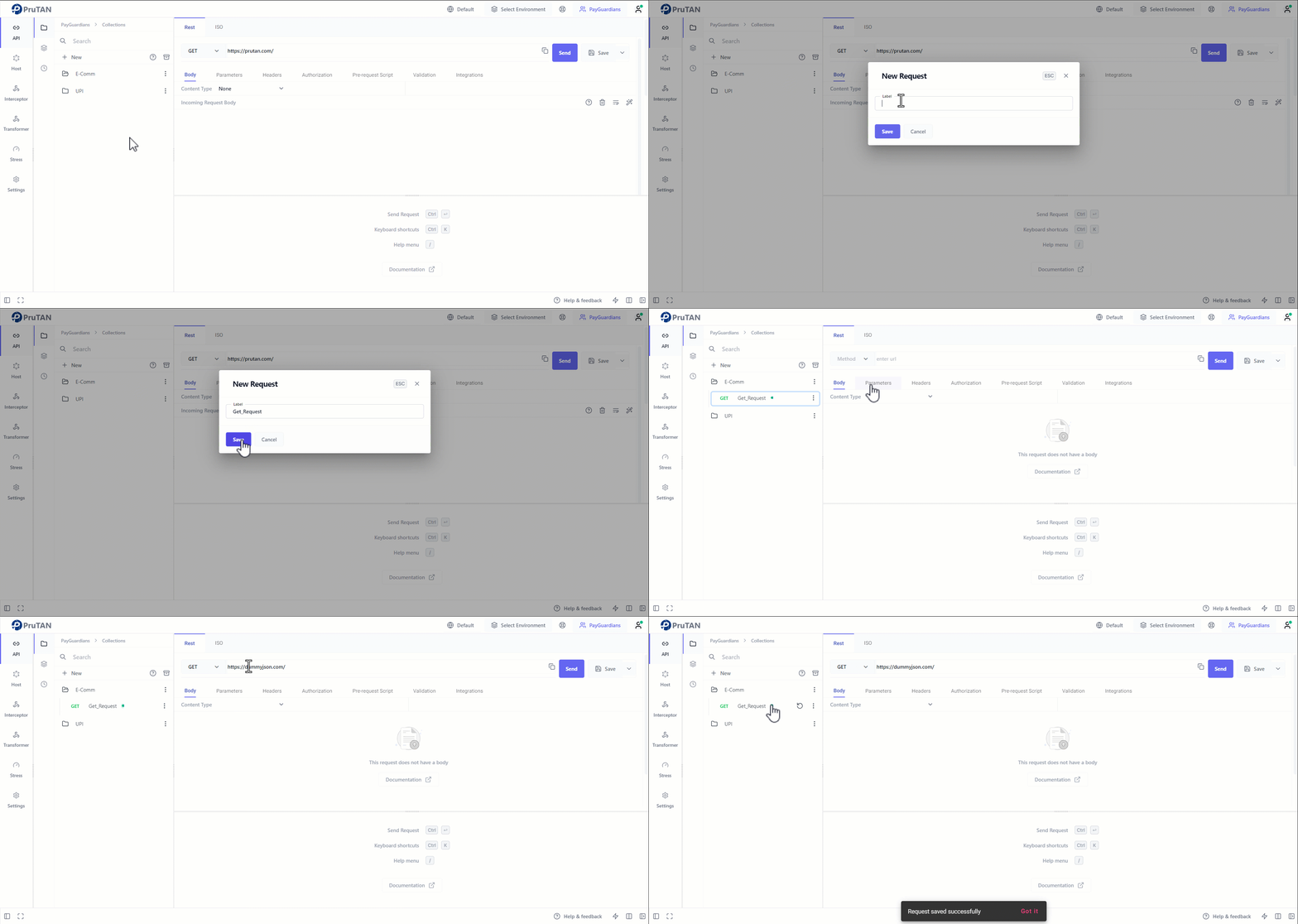
Pokemon API
Let's try another API.
We'll be using the Pokemon API, go ahead and create a GET request to the endpoint below:
https://pokeapi.co/api/v2If your request was successful, then you should get a JSON response as shown below:
{
  "ability": "https://pokeapi.co/api/v2/ability/",
  "berry": "https://pokeapi.co/api/v2/berry/",
  ...
  "pokedex": "https://pokeapi.co/api/v2/pokedex/",
  "pokemon": "https://pokeapi.co/api/v2/pokemon/",
  ...
  "version-group": "https://pokeapi.co/api/v2/version-group/"
}Image 1 :
The Pokemon API has returned us three new API endpoints or URLs, let's pick the characters URL and explore it.
Now, let's create a GET request to the characters URL, append /pokemon to the URL you already have on PruTAN or copy paste the URL below:
https://pokeapi.co/api/v2/pokemonThe API should have returned a huge amount of data, something similar to the one below:
{
  "count": 1279,
  "next": "https://pokeapi.co/api/v2/pokemon?offset=20&limit=20",
  "previous": null,
  "results": [
    {
      "name": "bulbasaur",
      "url": "https://pokeapi.co/api/v2/pokemon/1/"
    },
    {
      "name": "ivysaur",
      "url": "https://pokeapi.co/api/v2/pokemon/2/"
    },
    ...
    ...
}Image 2 :
Try experimenting with the /pokedex, /berry and the other endpoints as well.
Leveraging AI within PruTAN, you can enhance your API testing process:
AI-powered Request Creation : Automatically generate request bodies with suggested parameters, headers, and validation rules, reducing manual effort and errors.
Automated Response Analysis : AI can analyze the responses to highlight anomalies and provide insights.
Script Generation : Use AI to generate scripts for various testing scenarios, automating repetitive tasks and ensuring consistency.
One-click Request Creation : Future AI capabilities will allow you to create entire requests with a single click, streamlining the testing process.
REST & HTTP Protocols
Learn more about REST and HTTP protocols.